A UPI collect request scam works by reversing the direction of a payment: you believe you are about to receive money, but the moment you approve and enter your PIN, your own account is debited. In the cricket ID and colour-prediction world, so-called deposit agents use this trick constantly, dressing a payment request up as a “deposit link” or a “credit confirmation”. This breakdown explains how the mechanic works, the five checks that expose it, and what to do in the first hour if you have already tapped approve.
Table of Contents
How the UPI Collect Request Scam Works
UPI moves money in two directions. A push payment is one you start yourself: you scan a QR code or type a UPI ID, enter the amount, and confirm with your PIN. A collect request flows the other way. Someone else asks your app to pay them, and a pending request appears on your screen, waiting for your approval.
The scam abuses that second flow. A fraudster sends you a request for, say, ₹1,999, wrapped in a story: this is your refund, your winnings, your cashback, or a step needed to “activate” an incoming credit. The notification looks official because it genuinely arrives through your real UPI app. Only the story around it is false.
If you tap approve and enter your PIN, you have authorised an outgoing payment. Nothing was hacked. No OTP was stolen. You performed a perfectly normal UPI transaction – just in the opposite direction from the one you believed. That is why the trick is so effective: it exploits haste and confusion rather than any technical flaw in the payment system.
- The request arrives inside your genuine UPI app, so it feels trustworthy
- A message on WhatsApp or Telegram supplies the false context around it
- Round amounts, countdown pressure and “approve to receive” wording are the giveaways
- The debit is instant and lands directly in the fraudster’s account
Receiving Money Never Needs a PIN
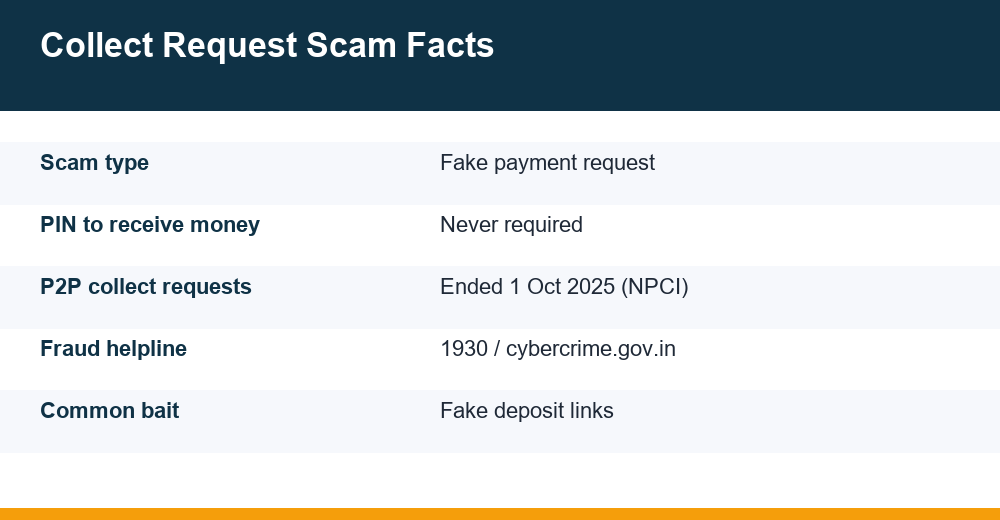
This is the single rule that defeats the whole trick, so it deserves its own section: you never need to enter your UPI PIN to receive money. Not to accept a refund, not to claim winnings, not to confirm a credit, not to “unlock” a payment. Incoming money lands in your account with zero action from you.
Your PIN exists for one purpose: authorising money to leave your account. Banks and the payment network repeat this point in every safety campaign, because fraudsters rely on people not knowing it. The moment anyone tells you to approve a request, enter a PIN or scan a code so that money can come in, the conversation has become a fraud attempt – no matter who they claim to be.
Build one habit around it. Before touching any approval screen, ask yourself a single question: am I paying, or receiving? If the answer is receiving, close the app. There is nothing for you to do. If a promised credit never arrives on its own, the promise was never real, and no amount of tapping would have made it real.
Why the confusion persists
Approval screens and payment screens look similar inside most apps, and the script is written so that you are rushing. Scammers call while the request is pending, keep you on the line, and talk you through each tap. A genuine payer never needs to supervise you while you receive money – the supervision itself is the red flag.
Language does part of the work too. Phrases such as “request accept kar lo”, “verification payment” and “refund approve karein” all describe an outgoing payment while sounding like an incoming one. Read the screen, not the sentence someone is saying to you.
The Gaming Deposit Twist: Agents and Fake Deposit Links
Generic bank warnings cover refund tricks, but the betting-ID ecosystem has its own version of the UPI collect request scam that those pages rarely describe. It targets people who already intend to pay, which makes it far harder to spot.
Here is the setup. You contact an “agent” on WhatsApp or Telegram to top up a cricket ID or a colour-prediction wallet. Instead of giving you a UPI ID to pay, the agent says they will send a deposit link or a “payment request for faster credit”. What arrives is a collect request – sometimes for the amount you agreed, sometimes inflated, sometimes sent twice in the hope you approve both.
Because you were planning to pay anyway, approving feels natural. But you have now paid a personal account with no record of what it was for, no platform receipt and no recourse when the wallet credit never appears. The agent blames a “server issue”, asks you to pay again, and eventually blocks you. The same pattern runs through the wider con playbook in our cricket ID scam warning signs breakdown.
Notice what the agent gains from the reversal. A push payment you initiate leaves a UPI ID you can read, copy and report before any money moves. A request that lands in your app flips the tempo: you are reacting, the amount is already filled in, and the payee name is a line of text you are unlikely to read twice.
Keep the fundamentals in view as well. Even when a deposit does go through, these are chance-based games with a built-in house edge, real money is at risk, and the whole category is strictly for adults 18+. If gambling pressure or distress is part of the picture, free confidential support exists – Tele-MANAS, India’s national mental health helpline, runs 24×7 on 14416.
Can a Request Pull Money From Your Account?
A common fear is whether a stranger can simply pull money out of your account by sending a request. The honest answer is reassuring: no debit happens without your approval and your PIN. A pending collect request sitting in your app has taken nothing. Ignoring it costs you nothing. Declining it costs you nothing.
The danger lives entirely in the approval step. The scam needs your fingers – one tap on approve, then your PIN. That is also why the payment network moved against the feature itself. NPCI, which operates UPI, directed that person-to-person collect requests would no longer be processed from 1 October 2025. Before that, such requests were already capped at ₹2,000 per transaction. Verified merchant collect requests, the kind genuine businesses use, continue to work.
That change has a practical consequence today. A payment request claiming to come from an individual “agent” is not something a legitimate person can even send on the peer-to-peer route any more. If a request still lands in your app, it is arriving through a merchant route – so check whether the payee name shown is a business you actually recognise and intended to pay.
- Pending requests take nothing; only approval plus PIN moves money
- Person-to-person collect requests stopped being processed from 1 October 2025
- Genuine merchant requests show a recognisable business name, not a random individual
- When in doubt, decline – a real payee can always share a UPI ID for you to pay directly
Treat any claim that a request “must” be approved within minutes as a sales technique, not a banking rule. Nothing in the payment flow expires in a way that costs you money, and a request that lapses can always be replaced by a payment you make yourself, on your own terms, to a name you have checked.
Five Smart Checks Before You Tap Pay
Every version of this fraud collapses under thirty seconds of scrutiny. Run these five checks on any payment screen before your thumb goes near approve – above all when someone is messaging or calling you while the request sits pending.
- Direction check: Does the screen say you are paying or receiving? If a PIN is being asked for, money is leaving. No exceptions.
- Name check: Read the payee name the app displays, not the name in the chat window. A mismatch between the two ends the transaction.
- Amount check: Does the figure match what you agreed, to the rupee? Inflated or duplicated requests are a classic move.
- Pressure check: Is anyone rushing you, staying on the call, or counting down? Genuine payments survive a ten-minute delay; scams do not.
- Origin check: Did you start this, or did it appear because of a link or message someone sent you? Unsolicited requests default to decline.
| What you see | Genuine deposit flow | Collect scam flow |
|---|---|---|
| Who starts the payment | You scan or enter the UPI ID yourself | A request appears, sent by the other side |
| PIN usage | You enter it knowing you are paying | You are told a PIN is needed to “receive” |
| Payee name | Matches the business you chose | Unknown individual or lookalike name |
| Pace | No one hurries you | Live chat or call pressures instant approval |
| Record | App history plus platform receipt | Only a chat thread that can be deleted |
The direction question alone catches nearly every variant, including the QR versions where scanning and entering a PIN performs a payment you believed was a credit. Say it out loud if it helps: paying, or receiving?
Variants of the Same Trick to Recognise
The collect request is one delivery method for a single idea: persuade you to authorise a payment while you think you are accepting one. Once you recognise the idea, the variants stop working on you. Each of the following has turned up in deposit and withdrawal conversations around gaming wallets.
- QR code to receive: you are sent a code and told scanning it credits your wallet. Scanning plus a PIN always pays out, never in.
- Screen-sharing “help”: an “agent” asks you to install a remote-view app so they can “fix” a failed deposit, then watches you type your PIN.
- Overpayment reversal: someone claims they sent you extra by mistake and sends a request to “return” it. No money ever arrived.
- Duplicate requests: two identical requests seconds apart, betting that you approve both while clearing notifications.
- Lookalike handles: a payee name copying a known brand with one changed character, so the app display looks familiar at a glance.
Also resist the “small test payment” framing. Being asked to send or approve a token amount to “verify” an account is a way of establishing that you will comply, and the second request is rarely small. A verification that costs money is not a verification.
What Happens If You Approve a Fake Request?
The mechanics are brutally simple. The instant you confirm with your PIN, your bank treats the transfer as an authorised transaction. The amount leaves your account in seconds and reaches the fraudster, who typically moves it onward through other accounts almost immediately. There is no pending window and no built-in undo.
This is what separates the UPI collect request scam from card fraud or an account takeover. Nobody broke into anything: the system recorded you as a willing payer. Recovery therefore depends on speed – getting the trail reported before the money is layered away – rather than on proving a technical breach.
Expect the fraudster’s behaviour to follow a script after the debit. Some vanish instantly. Others stay in character, claiming the payment “failed” and sending a second request, or offering to “reverse” the first if you approve one more. That is a double-dip attempt on someone who has already shown they will tap. Any message arriving after a suspicious debit belongs to the same operation.
What approval does not do
One approved request does not hand anyone standing access to your account. It does not expose your PIN, and it does not let future requests debit you automatically. Every transaction needs fresh approval – so one mistake, caught quickly, stays one mistake rather than becoming an open tap.
First-Hour Response After a Fraudulent Approval
Money moves fast, so your response has to move faster. Fraud advisories talk about a golden hour: the sooner the trail is reported, the better the chance that banks along the chain can freeze the funds before they are withdrawn or scattered. Here is the sequence.
- Call 1930, the national cyber fraud helpline. It runs round the clock and exists for financial cybercrime exactly like this.
- Note the acknowledgement number you are given, then complete the complaint online on the National Cyber Crime Reporting Portal – the portal’s own instructions say registration should be completed within 24 hours.
- Have the details ready: bank or wallet name, the transaction ID or UTR number, the date, the amount and the recipient’s UPI handle.
- Notify your own bank or UPI app through its fraud or dispute channel, so the debit is flagged on your side as well.
- Screenshot everything before it disappears: the chat, the request, the payment confirmation, and the fraudster’s number or handle.
- Follow up on your complaint – and report even if hours or days have passed, because late reports still feed freezes and investigations.
Keep the evidence tidy. The portal accepts supporting documents as uploads, and a clean set – statement, transaction reference, chat thread, screenshots – is faster to act on than a scattered pile. Save copies for yourself before uploading anything.
Do not pay anyone who contacts you afterwards promising recovery for a fee; refund-recovery callers are a well-documented second wave of fraud aimed at people who have already lost money. The step-by-step evidence checklist in our report online gaming fraud walkthrough covers what investigators ask for and how to present it.
If the loss happened while topping up a betting wallet, keep that context in your report. The “agent” handle and the chat thread are precisely the details that link your case to others involving the same operator.
How to Decline, Block, and Stay Protected
Declining a collect request is always safe. Open the request in your UPI app and choose decline or reject; no PIN is needed and nothing leaves your account. Most apps also let you block or report the requester from the same screen, which stops repeat attempts from that handle and feeds the app’s own fraud signals.
A few standing habits shrink your exposure to almost nothing:
- Treat every unsolicited payment request as a decline by default – a genuine payee can simply receive a payment you initiate
- Never approve anything while someone is on a call or a live chat with you
- Keep your UPI PIN entirely to yourself; no agent, bank staffer or “support” worker ever needs it
- Review your UPI app’s settings and restrict or mute incoming payment requests where the app allows it
- Use the in-app report option so fraudulent handles get flagged at the network level
- Check your statement weekly, so a small unexplained debit is caught in days rather than months
Apply the same scepticism to the other direction of the pipe. Deposits and withdrawals handled through informal agents share one weakness: the safety of your money depends entirely on a stranger’s honesty, and there is no receipt to appeal to. Before sending anything, read how payout flows actually behave in our cricket ID withdrawals via UPI explainer – the red flags on the way out mirror the ones on the way in.
None of this requires technical skill. It requires one pause and one question at the approval screen, every single time. Your PIN pays; it never receives.
Frequently Asked Questions
Can someone take money from my account through a UPI collect request?
Not without your participation. A pending request takes nothing by itself – money only moves after you tap approve and enter your UPI PIN. Ignoring or declining a request costs you nothing. Since 1 October 2025, NPCI has also stopped processing person-to-person collect requests, so any request you now receive should show a recognisable merchant name.
Do I need to enter my UPI PIN to receive money?
Never. Your UPI PIN exists only to authorise money leaving your account. Incoming payments, refunds, winnings and cashbacks arrive automatically with no action from you. Anyone who says a PIN, an approval or a QR scan is needed to receive money is attempting fraud, so end the conversation and decline whatever sits on your screen.
What happens if I approve a fake collect request?
The amount debits instantly and reaches the fraudster, because your bank records it as an authorised payment made with your own PIN. That is the core of the UPI collect request scam: nothing is hacked, so recovery depends on speed. Expect follow-up messages asking you to approve again to “reverse” it – a second attempt, not help.
What should I do immediately after approving a fraudulent request?
Act within the first hour. Call the 1930 cyber fraud helpline, note the acknowledgement number, and complete your complaint on cybercrime.gov.in with the transaction ID and the recipient’s UPI handle. Alert your bank or UPI app, screenshot the chat and payment proof before they vanish, and follow up even if time has passed.