Strong OTP fraud protection matters more for a gaming account than almost anywhere else, because one six-digit code can hand a stranger your login, your wallet balance and your linked payment details in under a minute. Fake “support agents”, screen-sharing apps and SIM swaps are the three routes Indian players get caught by most often. This breakdown explains how each one works and sets out eight plain rules that close the door.
Table of Contents
Why Gaming Accounts Are a Soft Target
A gaming wallet is a strange mix: it holds real money, yet it usually sits behind a login far weaker than any bank’s. Plenty of cricket ID and colour-prediction accounts open with nothing more than a phone number and a one-time password. Whoever holds that code holds the account, and that includes the balance, the withdrawal settings and the linked payment details.
Fraudsters also know that players in this space already do business inside chat apps. Deposits, bonuses and “support” all happen over WhatsApp or Telegram, so a message from an unknown number claiming to be the platform’s helpdesk looks completely normal. It is the same social opening used across the wider patterns collected in our cricket ID scam warning signs checklist.
There is a third reason, and it does the real damage. Unlike a bank, most of these platforms publish no verified helpline you can ring back to check whether a caller is genuine. Victims cannot cross-check, so they comply. That verification gap is what impersonators are selling.
One honest note before the rules. These games are for adults 18+, outcomes are decided by chance with a built-in house edge, and money moved into any gaming wallet is already at risk. Good OTP fraud protection cannot change those odds. It can only stop a thief from taking what the games have not.
How Do Scammers Actually Steal OTPs?
There is no magic in OTP theft. Every method ends the same way: you, your phone or your mobile network hands the code over. Only the route varies, and each route leaves an early giveaway you can learn to spot before any money moves.
| Tactic | How the code leaks | Early giveaway |
|---|---|---|
| Fake support call | You read the code aloud to a “verification agent” | The caller manufactures urgency, then asks for the OTP |
| Phishing page | You type the code into a lookalike login or deposit page | The link arrived in chat; the address is misspelt or brand new |
| Screen sharing | A remote-view app shows your whole screen, OTP included | “Support” insists you install an app to fix the issue |
| Malicious APK | A sideloaded app with SMS permission reads codes silently | A game file asks for SMS or contacts access at install |
| SIM swap | A duplicate SIM diverts every OTP to another handset | Your phone drops to no network for hours |
Notice that none of these tactics breaks any encryption. Indian bank and police awareness material describes the same shape again and again: the fraud is a two-step attack. Personal details leak first, through a shady APK, a phishing form or an older data breach, and the OTP grab comes second, dressed up as help.
That order matters. If a caller already knows your name, your platform and roughly when you last deposited, it does not prove they are genuine. It only proves your details have travelled.
Read the message, not the messenger
Every OTP arrives with a plain description of what it authorises, and almost all carry a do-not-share warning. A code for a withdrawal says withdrawal; a code for a SIM change says SIM change. Fraudsters rely on you reading the digits and ignoring the sentence around them, because that sentence is often the only thing contradicting their story.
- The OTP text names an action you did not start
- The amount in the message is higher than anything you entered
- The sender ID is a random number rather than a registered header
- The code arrives while you are on a call with “support”
- Two or three codes arrive in quick succession as someone retries
OTP Fraud Protection: 8 Rules for Gaming Accounts
These eight rules cover every theft route in the table above. None of them needs technical skill. Most are simply the discipline of pausing before a code leaves your phone.
- Read the SMS before using the code. The message states what the OTP authorises, whether that is a login, a payment or a SIM change. If the text does not match what you think you are doing, stop there.
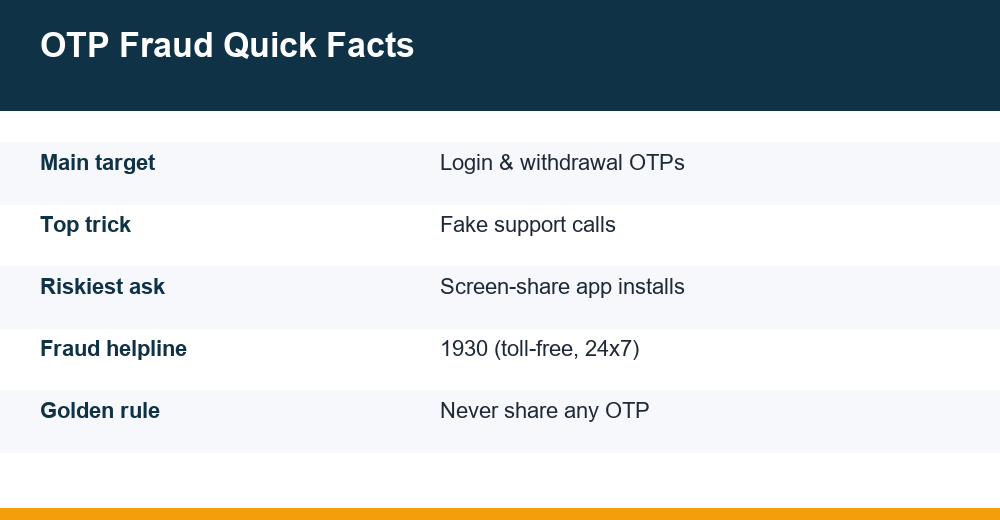
- Never speak a code aloud. No genuine platform, bank or wallet asks for an OTP on a call. The request itself is the proof of fraud, and no explanation changes that.
- Never install a screen-sharing or remote-support app because someone asked you to. If one is already on the phone for a legitimate work task, uninstall it the moment that task ends.
- Type OTPs only into apps or pages you opened yourself, never into a link pushed to you on WhatsApp or Telegram, and never into a page reached from a search advertisement.
- Refuse SMS and contacts permissions to sideloaded gaming APKs. A game has no reason to read your messages, and an app that insists is telling you what it is for.
- Keep gaming logins separate. A phone number and email that are not tied to your main bank account limit how far one slip can travel.
- Protect the SIM itself. Set a SIM PIN and ask your operator what extra verification it offers before a duplicate SIM can be issued on your number.
- Slow down on purpose. Manufactured urgency, such as “your ID will be blocked in ten minutes”, is the one ingredient every OTP scam needs. Remove the hurry and the scam usually collapses.
Screenshot these or pin them in a family group. OTP fraud protection works best as a shared habit, because fraudsters frequently target whichever family member happens to answer the phone, not the person who opened the account.
SIM Swap: When OTPs Stop Reaching You
A SIM swap attack does not steal your codes. It steals the destination. Using leaked personal details, a fraudster persuades a telecom process to issue a duplicate SIM for your number. The moment it activates, your own SIM goes dead, and every call, SMS and OTP flows to a handset you have never seen.
The classic warning sign is a sudden, unexplained loss of network that lasts hours, sometimes preceded by strange missed calls designed to make you switch the phone off or put it on silent. Indian reporting on these cases describes victims losing large sums in the quiet window before they realise the signal is not coming back on its own.
If your phone drops to no service in an area with normal coverage and a restart does not fix it, treat it as an emergency rather than a glitch. Contact your operator from another phone immediately and ask whether a SIM change or port-out was requested on your number. Not every outage is fraud, but an outage paired with unexpected alerts almost never has an innocent explanation.
- Unexplained “no service” while others on the same network are fine
- A flurry of missed calls from unknown international or private numbers
- SMS alerts about a SIM change or porting request you never made
- Being logged out of accounts even though your passwords are correct
- Transaction alerts arriving by email while your phone stays silent
Prevention here is paperwork done in advance. Ask your operator about additional verification for SIM reissue, and avoid posting your mobile number alongside your full name and city in public gaming groups. Those details are the raw material a swap request is built from.
Fake Support Agents and the Screen-Share Trap
The most damaging gaming-account takeovers start with a friendly message, not a hack. A “support executive” contacts you about a pending withdrawal, a bonus, or a login problem you happened to mention in a public group. They sound patient and professional, right up to the moment they need “one small verification”.
Why do fake support agents push AnyDesk or TeamViewer?
Remote-access tools such as AnyDesk and TeamViewer are legitimate software built for IT support, but they let another person watch your screen live. Once you install one and read out the access code, the fraudster sees every notification that lands, OTPs included, without you dictating a single digit. Indian banks have issued repeated customer advisories about this exact ploy, and the Reserve Bank of India flagged remote-access app fraud as early as 2019.
A real platform never needs to see your screen. Anything an honest support team can do, it does from its own dashboard. The install request is itself the red flag, and there is no second signal worth waiting for.
Where the fake numbers come from
Many victims are not contacted at all. They go looking for help, search for a withdrawal helpline, and call the first number they find. Bank advisories in India say plainly that support numbers found through a search engine should not be trusted; use the contact details shown inside the official app.
- Unsolicited contact about a withdrawal you did not report
- A request to install AnyDesk, TeamViewer or any “QuickSupport” app
- Any ask for an OTP, PIN, password or card number
- A promise to release a stuck payout once you “verify” with a code
- Pressure to stay on the call while you complete steps
Be especially careful during account setup, when chatting with agents feels routine and nothing looks unusual. The messages involved in a typical WhatsApp cricket ID activation look very similar to the opening lines of an impersonation, which is why that flow deserves its own scrutiny.
Can Someone Get In With Just an OTP?
For many gaming platforms, unfortunately, yes. Banks usually layer a password, a device check and transaction limits around each code. A typical cricket ID or prediction-app login, by contrast, is a phone number plus an OTP, which means the code is not a second factor at all. It is the only factor. The common flows described in our Daman game login walkthrough show how little else stands between a code and a live session.
That single code can expose far more than a balance. A hijacker who gets in can typically see or change:
- Your wallet balance and any pending withdrawal requests
- The bank account or UPI handle payouts are sent to
- Your registered phone number and recovery details
- Deposit history, which reveals how much you can be pressured for
- Referral contacts, meaning friends who become the next targets
This is why OTP fraud protection on a gaming account deserves the same seriousness people reserve for banking apps, even though the login screen looks far more casual. The weaker the lock, the more the key is worth.
Shared an OTP by Mistake? First-Hour Checklist
Prevention is the best OTP fraud protection, but a fast response limits the damage after a slip. Police guidance in India consistently treats the first hour after an unauthorised debit as the critical window, because money is easiest to trace or hold before it is moved onwards through other accounts. Work through these steps in order and do not stop to assign blame.
- Cut the access. Log out of all sessions, change the password or PIN if the account has one, and switch off the phone’s internet if a screen-share app may still be running.
- Uninstall any remote-access app the caller made you install, then restart the phone and check the installed-apps list for anything else you do not recognise.
- Call your bank or UPI app and ask them to freeze the card, block the handle or flag the transaction if money has already moved.
- Call 1930, the national cyber fraud helpline. It is toll-free and government-run, and the operator records the transaction reference so the receiving bank can be alerted.
- File a written complaint on the National Cyber Crime Reporting Portal, attaching screenshots, SMS alerts and transaction IDs. The portal record makes every later conversation with the bank easier.
- If your signal died, call your telecom operator from another phone and ask them to check for a SIM change or porting request on your number.
| Who to contact | For what | Keep ready |
|---|---|---|
| 1930 helpline | Money debited without consent | Transaction ID, amount, date |
| Bank or UPI app | Freezing card, handle or account | Registered number, recent debits |
| Telecom operator | Suspected SIM swap or port-out | Alternate phone, connection details |
| Platform support, in-app only | Session logout, payout detail check | Account ID, screenshots |
Two cautions. Keep every message and notification, because deleting “junk” often deletes the evidence. And ignore anyone who later offers to recover your money for a fee; recovery-agent offers are a well-documented second scam aimed squarely at people who have just lost once. Reporting through 1930 and the portal costs nothing.
Everyday Habits That Keep Your Codes Safe
Most OTP theft is opportunistic. Fraudsters work through lists and give up quickly on hard targets, so a few standing habits move you off the easy list permanently.
- Enable debit alerts by SMS and email so every rupee of movement pings you instantly
- Review app permissions monthly and strip SMS access from anything that is not your default messaging app
- Keep the phone’s operating system updated, since SMS-reading malware relies on old versions
- Use an app lock on payment and gaming apps so a borrowed phone is not an open wallet
- Turn off message previews on the lock screen so codes are not readable over your shoulder
- Never post payment problems in public groups with your number visible, because impersonators mine those posts for fresh targets
Finally, remember what OTP fraud protection can and cannot do. It guards the account, not the odds. Chance-based games keep their house edge no matter how secure your login is, real money is genuinely at risk, and only adults 18+ should be anywhere near them. If playing itself has started to feel out of control, free and confidential help exists: the government’s Tele-MANAS mental-health helpline on 14416, and the 1930 line for money lost to fraud.
Frequently Asked Questions
Can someone access my account with just an OTP?
Often, yes. Many gaming and cricket ID logins use only a phone number plus an OTP, with no password at all, so one code means complete access. Banks usually layer PINs, device checks and limits on top, but a gaming wallet rarely does. Treat every login code with the same seriousness as a payment approval.
How do scammers steal OTPs?
Four main routes: fake support calls that talk you into reading the code aloud, phishing links that capture whatever you type, screen-sharing apps that let a fraudster watch the code arrive, and SIM swaps that divert your messages entirely. All four depend on urgency, so a deliberate ten-second pause defeats most attempts.
What is a SIM swap and how does it affect OTPs?
A SIM swap is when a fraudster obtains a duplicate SIM for your number using stolen personal details. Your own SIM goes dead, and every call and OTP is delivered to their handset instead. A sudden, unexplained loss of network signal is the classic sign, so contact your operator from another phone immediately.
What should I do if I shared an OTP by mistake?
Act within the first hour. Log out of all devices and change your credentials, ask your bank to freeze cards or UPI if money moved, call the toll-free cyber fraud helpline 1930, and file a complaint on the national cybercrime portal with screenshots and transaction IDs. Also uninstall any screen-sharing app the caller made you install.