A fake colour prediction app rarely looks fake: it copies the logo, colours and round timer of a known platform, then arrives through a friendly Telegram or WhatsApp link. Cybersecurity researchers at CloudSEK found that ready-made source code for these games is openly available and even taught in online tutorials, which is why dozens of near-identical APKs circulate at any time. This page walks through six concrete checks you can run before tapping install, plus the clean-up steps if one is already on your phone.
Table of Contents
Why a Fake Colour Prediction App Is So Easy to Make
Building a fake colour prediction app does not need a development team. CloudSEK’s research into these games reported that ready-made source code is handed out on websites and walked through in video tutorials, and its analysts mapped around 60 such prediction websites promoted through hundreds of social media handles. Anyone who picks up the kit can re-skin it with a new name and logo in days.
That is why you keep meeting apps that look the same but carry different names: the interface, the countdown and even the colour wheel are often the same template underneath. The operator controls the server, the result you are shown and, crucially, the wallet. The wider trap these apps feed into is covered in our breakdown of how the colour prediction scam actually works, stage by stage.
The same research also traced APKs downloaded from those sites back to domains hosted on Chinese cloud infrastructure, with several addresses mapping to the same region. In plain terms, the app on your screen may have no connection at all to the country, company or team named in its store-style description.
One honest baseline before any checklist: even on a platform that pays out, colour prediction rounds are chance with a built-in house edge, real money is at risk, and this page is written for adults 18+ as awareness material only. No install-time check changes those odds. The checks below only help you avoid the apps built specifically to collect a deposit and disappear.
- Clone kits mean dozens of lookalike apps can exist at the same time
- Same template, different name and logo is the standard pattern
- The operator controls both the result screen and the wallet balance
- Hosting and ownership often sit far away from the branding on screen
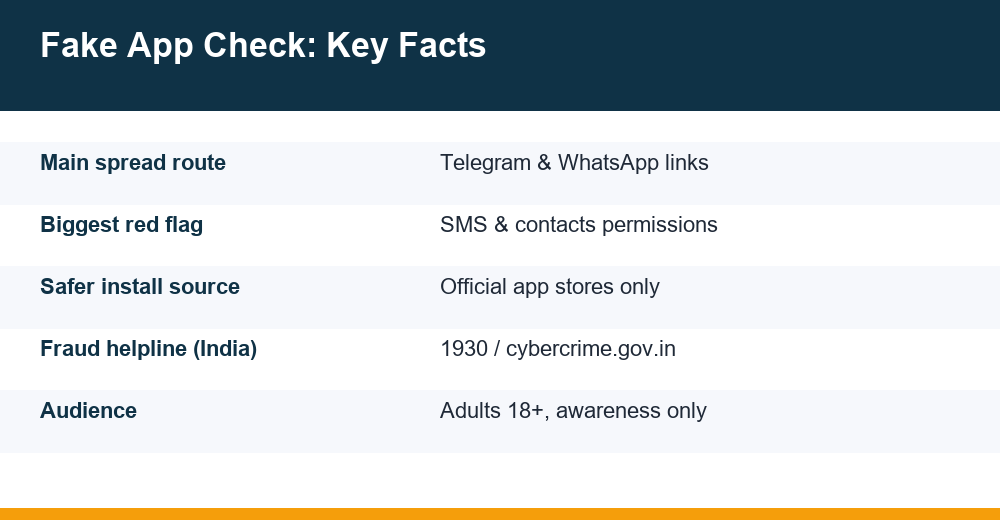
Telegram and WhatsApp Links: The Main Delivery Route
Is it safe to download gaming apps from Telegram links? In short, no, and the reason is structural rather than a matter of luck. A file forwarded in a chat has no review process behind it. Nobody scanned it, nobody verified who uploaded it, and the same filename can be swapped for a different file an hour later. Messaging apps are delivery pipes, not app stores.
Fraud campaigns lean on chat links because they combine reach with borrowed trust: the link arrives from a group member, a self-styled mentor, or a friend who was forwarded it themselves. Channels openly advertise hack or mod builds of prediction apps, usually with a deposit attached before the file is released. That is a double warning: a tampered file plus an upfront payment.
What a Chat Link Cannot Tell You
A link in a chat can also point to a lookalike website one letter away from a real one. Before touching any download page, read the full address slowly: swapped letters, inserted hyphens or a different ending such as .net in place of .com are classic clone markers. We walk through a safer, source-by-source routine in the Daman game app download walkthrough.
- Chat-forwarded APKs carry no store review and no malware scan
- Hack or mod channels bundle tampered files with deposit demands
- Lookalike domains differ by one letter, a hyphen or the ending
- A forwarded file tells you nothing about who built or edited it
- Links in chats are often rotated weekly once a domain is reported
How to Check the Package Name and Publisher
Every Android app carries a package name: a unique technical ID such as com.example.appname that stays the same across updates. A clone can copy an icon and a display name perfectly, but two apps cannot share one package name on the same phone, and a store listing’s address exposes the real one. Checking takes under a minute.
- Long-press the app icon and tap App info, or open Settings, then Apps, and select the app.
- On most phones the package name appears on that screen; on others, open Advanced or scroll to the bottom of the details.
- If the app claims to be on an official store, open its listing in a browser: the address ends in id= followed by the genuine package name.
- Compare the two strings character by character. A mismatch, or a garbled package such as com.aaa123.game, is a strong clone signal.
Reading the Publisher Like a Checklist
The publisher check follows the same logic. On an official listing, tap the developer name to see what else they publish, when the app was last updated, and whether a real website and contact address exist. A publisher with one app, created weeks ago, no site and a free webmail address deserves suspicion, however polished the screenshots look.
- Developer history: several maintained apps beats one brand-new entry
- Update dates: an abandoned build is a security problem on its own
- Contact details: a business address and domain email, not just a chat handle
- Reviews over time: a burst of five-star text posted in days reads as bought
- Named company: check whether that company exists outside the listing
Permissions a Prediction App Should Never Ask For
What permissions should a prediction app never ask for? Start from what the app actually does: it shows rounds, accepts entries and displays a wallet. That needs an internet connection and very little else. Anything beyond that should stop you, especially the requests below.
- SMS access can read bank alerts and one-time passwords, the keys to your money
- Contacts harvests your friends’ numbers for the next wave of invites
- Call logs profiles you and the verification calls your bank makes
- Accessibility services let an app read the screen and tap buttons for you
- Device admin rights make the app difficult to uninstall
- Install unknown apps lets one bad app pull in others
On current Android versions you can review and withdraw all of this under Settings, Apps, Permissions, or through the Privacy dashboard, which shows which apps used the camera, microphone and location recently. Deny first and see whether the app still runs: a game that refuses to open without SMS access is telling you what it is really for.
Watch the timing too. Many clones ask for nothing at install, then request sensitive access at the exact moment you reach the deposit or withdrawal screen, when you are least likely to say no. A request that appears only when money is involved deserves more suspicion, not less.
Remember that round outcomes sit on the operator’s server either way. Our explainer on how prediction rounds are generated covers why no honest app needs special phone access to show you a result.
The 6-Point Checklist Before You Install
Here is the full routine for screening a fake colour prediction app, condensed into six checks. Run them in order. A single hard red flag is reason enough to walk away, because there is always another day and never a genuine reason to install something tonight.
| # | Check | What to look at | Hard red flag |
|---|---|---|---|
| 1 | Source of the file | Where the download link lives | APK via Telegram, WhatsApp or a forwarded link |
| 2 | Website address | Spelling, hyphens, domain ending | Lookalike domain or an address that keeps changing |
| 3 | Package name | App info screen vs store listing | Mismatch or a random-looking package ID |
| 4 | Publisher | Developer page, other apps, contact details | Brand-new publisher, no site, no history |
| 5 | Permissions | Requests at install and on first run | SMS, contacts, accessibility or device admin |
| 6 | Payment setup | Where the deposit actually goes | Personal UPI handles instead of a business account |
The sixth check matters even after a clean install. A genuine business collects payments through a merchant account in the company’s name, not a rotating list of personal UPI IDs or a bank account belonging to an individual. If the deposit screen shows a person’s name, treat the app as compromised regardless of how smooth the interface feels.
Notice how often urgency is doing the work: a bonus that expires in ten minutes, a group countdown, a link that will be deleted soon. Pressure to skip your own checks is itself one of the checks. Nothing genuine collapses because you waited a day and read the details properly.
How to Tell an APK File Is Fake
How can you tell if an APK file is fake before opening it? You cannot be certain from the filename, which is exactly what distributors exploit. A fake colour prediction app APK usually gives itself away through context and behaviour rather than the icon or the title.
- It arrives outside any store, through a chat link or a promoted download button
- The file name imitates a known brand but the version number is odd or missing
- Your phone asks you to allow installs from unknown sources, a prompt that exists precisely because sideloaded files skip review
- A built-in security scan flags it during install, and the page urges you to continue anyway
- It demands SMS, contacts or accessibility access immediately after launch
- In-app support is a personal chat number rather than any ticket or email system
The download page itself leaks signals. Pages built for these files tend to carry no company name, no address, a single call to action and text copied from other sites, sometimes with mismatched brand names left in by accident. If the page cannot say who publishes the app, the app cannot be verified.
Behavioural tells continue after launch. Fake builds often push a deposit screen before you have seen a single round, show a pre-filled bonus balance to create urgency, or loop win notifications supposedly from other users. Treat these as staging rather than features: they exist to shorten the gap between install and first payment, which is the only moment the operator needs from you.
Why Clone Apps Stay Off the Play Store
Why are clone apps not on the Play Store? Because an official store is hostile terrain for them. Listing an app means passing automated malware scanning, declaring a verified developer identity, meeting the store’s own real-money gaming rules, and leaving a permanent public record of the publisher. Each of those steps threatens an operation built on disappearing.
Distribution through chat links removes all of it. There is no review queue, no takedown notice, no rating history filling up with withdrawal complaints, and the download link can be replaced the moment a domain gets reported. Researchers tracking these campaigns describe the same game resurfacing under fresh names and new domains repeatedly, a pattern a single store listing would make obvious.
Watch out for the middle option too: a website that asks you to add a shortcut to your home screen. The icon looks like an installed app, but you are using a web page with no listing, no publisher record and no update history behind it. Convenience is the pitch; accountability is what you give up.
The honest conclusion as a user: absence from official stores is not a neutral fact about availability. It is a choice the operator made, and the burden of proof sits entirely on the app, not on you. If a platform exists only as an APK file and a chat group, you have already learned the most important thing about it.
Already Installed One? Clean-Up and Reporting Steps
What should you do if you already installed a fake app? Work in this order: cut its access, remove it, secure your money, then report. Speed matters most if money has already left your account, so do not spend time arguing with in-app support first.
- Turn on flight mode, or switch off Wi-Fi and mobile data, while you work.
- Before deleting anything, screenshot the app page, the deposit details, the transaction IDs and the chat or page the link came from.
- Withdraw the app’s permissions under Settings, Apps, Permissions, starting with SMS and accessibility.
- Uninstall it. If the uninstall button is greyed out, remove its device-admin rights first, or uninstall in Safe Mode.
- Run your phone’s security scan and install any pending system security updates.
- Change passwords for UPI apps, email and any account whose one-time passwords the app could have read, ideally from a different device.
- Watch your bank and UPI statements closely for the next few weeks and set low transaction limits meanwhile.
If money was taken, call the national cyber fraud helpline 1930 as soon as possible and file a complaint at cybercrime.gov.in with your screenshots, transaction IDs and the download link; police advisories stress that reporting within the first minutes and hours gives the best chance of freezing funds still in transit. For broader device hygiene, India’s Cyber Swachhta Kendra publishes CERT-In’s safe internet best-practices booklet, which has a mobile section worth keeping.
Two follow-ups people forget. Tell the group or contact who sent you the link, because the same file is probably still circulating there. And if the app read your contacts, warn the people most likely to trust a message appearing to come from you.
Finally, be fair to yourself about how it happened. These operations are run by teams who do this full time, and a fake colour prediction app is built to survive a casual glance. If the losses, or the urge to win them back, are weighing on you, free support exists: Tele-MANAS, the Health Ministry’s national mental health helpline, can be reached on 14416 across India.
Frequently Asked Questions
How can I tell if an APK file is fake?
Judge the context rather than the icon. A file shared through Telegram or WhatsApp, a brand-name filename with an odd version, a prompt to allow unknown-source installs, or a security warning during install are all strong signals. After launch, immediate demands for SMS, contacts or accessibility access confirm it. When several appear together, delete the file unopened.
Is it safe to download gaming apps from Telegram links?
No. Files forwarded in chats pass no review, no malware scan and no publisher verification, and the same link can serve a different file an hour later. Fraud campaigns prefer chat distribution precisely because it leaves no public listing, no ratings and no takedown trail. Treat any app that exists only as a chat-shared APK as unverified.
What permissions should a prediction app never ask for?
A prediction game needs little more than an internet connection. Requests for SMS access, contacts, call logs, accessibility services or device-admin rights go far beyond that. SMS access is the most dangerous, because it exposes bank alerts and one-time passwords. Deny these in your phone settings, and uninstall any app that refuses to run without them.
What should I do if I already installed a fake app?
Cut the phone’s connection, screenshot the deposit and transaction details, withdraw the app’s permissions, then uninstall it, removing device-admin rights first if needed. Run a security scan and change passwords for UPI, email and banking from another device. If money was taken, call the 1930 cyber fraud helpline fast and file at cybercrime.gov.in.